
Included with lifetime access
CostumePro 360
Stop Guessing Costume Sizes. Order Right the First Time.
Jackrabbit and Dance Studio Pro match a girth to a chart you typed in, pick a letter, and tell you to double-check it. CostumePro is the double-check: 17 brand charts already loaded, a verdict on every borderline dancer, a forecast of who’ll outgrow it before the show, and an order sheet for you to hand to your rep.
How it works
Measure
Pick the routine. Tap a name. Type the girth. Press Enter. It saves, shows the size, and moves to the next dancer — ten seconds a kid on measuring day.
Get the verdict
See the size in every brand you order from — 17 of them, every chart loaded from the company’s own page. Instead of a letter you get a call: “LC — on the line, 0.4 inches to spare. Going up costs a hem. Staying risks a costume that doesn’t zip.”
Order with confidence
One click builds the order sheet for your rep: sizes per routine, what you owe each vendor, what to charge families, and the order-by date worked backwards from the show.
See it in action
What you get
- 17 brand size charts already loaded — Weissman, Revolution, A Wish Come True, Balera, Capezio and twelve more — verified against each company’s own page, no typing in charts
- A verdict for every dancer, not a letter — the size, the margin in inches, and what going up or staying put will cost you
- Borderline flags before you commit, so the dancer on the line gets a decision in October, not a surprise in April
- A growth forecast from repeated measurements that tells you who’ll outgrow the costume before the show — and refuses to guess from two readings
- A one-click order sheet for your rep — sizes per routine, per-vendor totals, family pricing, and the order-by date
- Measuring-day mode that keeps up with a line of 200 kids: name, girth, Enter, next
- Runs alongside Jackrabbit and Dance Studio Pro — you keep your software; this is the double-check their own help page tells you to do
The problem
The dance costume size chart problem every studio has
Every studio owner knows the October drill. Two hundred kids, a tape measure, a legal pad, and a vendor chart that’s a different set of numbers from the one you used last year. You do your best. Then in April a box shows up, and three dancers in the same routine can’t zip.
It was never a measuring problem. It was a comparing problem. The same girth is a Weissman MC, a Revolution LC, a Just For Kix 12 and an A Wish Come True IMC — and half the brands publish that girth is the measurement that decides, while the other half don’t say. Nobody can hold that in their head in a lobby with a line out the door.
Your management software will match a girth to a chart — one you typed in yourself, one vendor at a time — and pick a size. Then Jackrabbit’s own help page tells you to “double-check the selected sizes before you order.” CostumePro 360 is the double-check. It holds every chart for you, flags the kid who’s on the line, and tells you who’s going to outgrow it before the show.
The measuring guide
How to measure a dancer for a costume
Girth is the measurement that decides the size on nearly every one-piece dance costume, and it is the one most studios get wrong. Here is how CostumePro asks you to take it, and why the other three are optional.
- Girth
- Tape from the top of one shoulder, down the front through the crotch, and back up to the same shoulder. The dancer stands naturally — not sucked in, not slumped. This one number is required; on Weissman, Revolution, Glamour, Hamilton and Kellé the company itself says girth decides, and CostumePro follows that rule.
- Chest
- Around the fullest part, tape level. Optional — it sharpens the verdict on two-piece costumes.
- Waist
- Around the natural waist, the narrowest point. Optional.
- Hips
- Around the fullest part of the hips. Optional — matters most for skirted and pant costumes.
Measure over a leotard or fitted clothes, never over a sweatshirt. Round to the nearest quarter inch (or half centimetre — CostumePro takes either). Write the number once, into the tool, on the spot: Measuring Day mode is a big girth box, Enter to save, and the next name comes up automatically. Measure the same dancers again mid-season and CostumePro turns those readings into a growth forecast, so the kid who is 0.4 inches from the next size in October is not a surprise in April.
Brand coverage
Every brand, verified from the company’s own chart
- A Wish Come True
- Art Stone
- Balera
- BalTogs
- Capezio
- Duo Dancewear
- Glamour Costumes
- Hamilton Theatrical
- Just For Kix
- Kellé
- Layla’s
- Mariia
- Revolution Dancewear
- Stardom Dance Costumes
- Tenth House
- Theatricals
- Weissman
A Wish Come True, Art Stone, Balera, BalTogs, Capezio, Duo Dancewear, Glamour Costumes, Hamilton Theatrical, Just For Kix, Kellé, Layla’s, Mariia, Revolution Dancewear, Stardom Dance Costumes, Tenth House, Theatricals and Weissman. Every chart was read directly from the company’s own sizing page, and each brand card links to it so you can check any number yourself. Boys’ and men’s charts are loaded for the eight brands that publish them, with an honest “no boys’ chart published” for the ones that don’t.
Where a brand states its own rule, the tool follows it and tells you, in words, why it chose the size it chose. You can add your own fit notes per brand (“lyrical dresses run small — size up”) and they show in every fit summary from then on. Any brand that isn’t listed can be added by pasting its chart in.
Also in the box: an order sheet by routine with brand, style number, unit price, parent fee at your markup and a purchase-order total across the season; a season calendar that sets measure-by and order-by dates from the show date and goes amber and red as they approach; roster import that recognises Jackrabbit and Dance Studio Pro class exports; Order Sheet PDF for the rep, Parent Letters PDF for families, CSV for your spreadsheet; inches or centimetres; one-click backup; and a “How this page works” guide at the top of every screen.
Fair questions
“Jackrabbit already sizes my costumes”
“Jackrabbit already sizes my costumes.”
It does — against a chart you typed in yourself, one vendor at a time, with no warning when a dancer is a quarter-inch from the line and no idea who’ll outgrow it by the show. Jackrabbit’s own help page says it: “double-check the selected sizes before you order.” CostumePro is the double-check. Seventeen brands already loaded and verified, a fit verdict with the margin to the next size, a growth forecast, and the order sheet with vendor totals and order-by dates. Keep Jackrabbit for tuition and attendance. Bring this to measuring day.
“My rep does this for me.”
Your rep sizes against their brand. CostumePro sizes against all of them at once, flags the borderline kids your rep never sees, and remembers what you ordered last year. Bring the order sheet to the rep and the conversation takes ten minutes instead of an hour.
“I already have a spreadsheet.”
So did everyone we built this for. The spreadsheet doesn’t know that Weissman’s chart changed, that a boy needs a different chart, or that Ava was 0.3 inches from the next size in October. CostumePro does.
“Is the sizing actually right?”
Every chart was read directly from the company’s own sizing page, and each brand card links to it so you can check any number yourself. Where a brand states its own rule — Weissman, Revolution, Glamour, Hamilton and Kellé all say girth decides — the tool follows it. And it tells you, in words, why it chose the size it chose.
Before you decide
Frequently asked questions
Which costume brands does CostumePro 360 cover?
Seventeen: A Wish Come True, Art Stone, Balera, BalTogs, Capezio, Duo Dancewear, Glamour Costumes, Hamilton Theatrical, Just For Kix, Kellé, Layla’s, Mariia, Revolution Dancewear, Stardom Dance Costumes, Tenth House, Theatricals and Weissman. Any brand not listed can be added by pasting its chart in.
Does it size boys?
Yes. Eight brands publish boys’ and men’s charts and those are loaded. For brands that don’t publish one, CostumePro says so rather than quietly using the girls’ chart.
Do I need all four measurements?
No. Girth is the only required measurement — it decides the size on nearly every one-piece costume. Chest, waist and hips are optional and make the advice more specific.
Does it work on a phone?
Yes. Measuring Day mode was built for a phone or tablet in the lobby: big girth box, Enter to save, next dancer automatically.
What happens when a brand changes its chart?
Each brand card links to the company’s current chart. Open it, glance at the girth row, and if it moved, paste the new one in. Two minutes, once a season.
Doesn’t Jackrabbit or Dance Studio Pro already do this?
They will match a girth to a size chart you enter and produce a purchase order. CostumePro 360 comes with 17 brands’ charts already loaded and verified, tells you which dancers are on the line between sizes and by how much, forecasts who will outgrow the costume before the show, and builds the order sheet with vendor totals, parent fees and order-by dates. It runs alongside your management software, not instead of it.
How does the growth forecast work?
Measure the same dancer a few times across the season and CostumePro projects where their girth will be in 90, 180 and 365 days and whether that pushes them into the next size before the show. It refuses to guess from two readings, tells you how confident it is, and reminds you when to measure again.
Where is my data kept?
In your Studio 360 account. Every dancer, measurement, routine and chart edit is saved against your membership on our server, so you can measure on a phone in the lobby and print the order sheet from the office computer without moving a file. A one-click backup you own is still there whenever you want a copy of your own, and nothing is shared with any other studio.
Step inside the tool
Go ahead — hover, click, try to use it. Members get the keys; everyone else gets a taste.
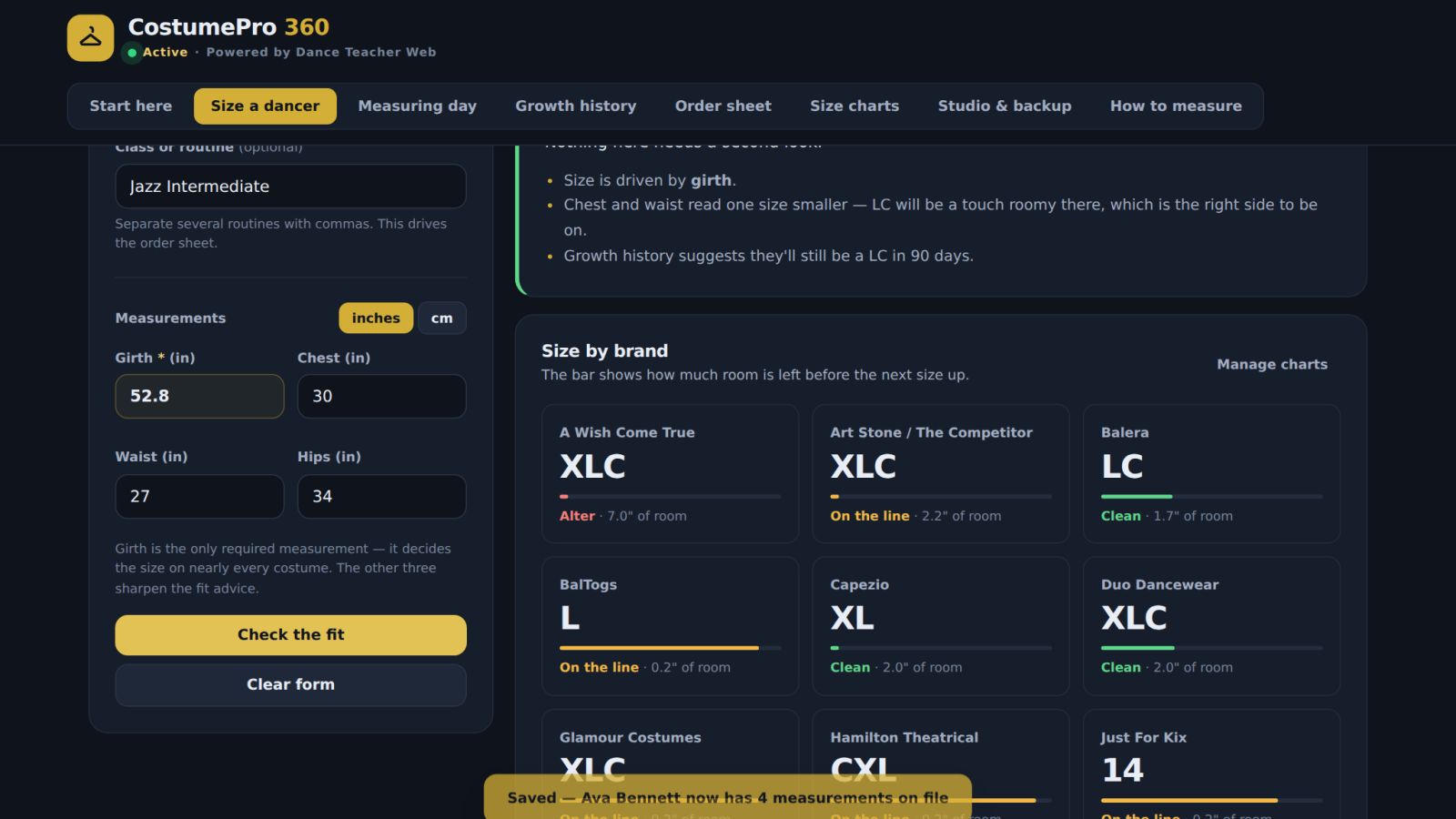
This tool is included in Studio 360. Become a member to launch it from your dashboard.
Unlock Full AccessCostumePro 360 — interactive preview
Claim an Insider spot
$579
One-time Insiders rate · Lifetime access · The last 100 lifetime seats
3 payments of
$217
Billed monthly x3 · Same lifetime access · 30-Day Guarantee