
Included with lifetime access
Student Success Roadmap 360
Prove Every Dancer Is Improving. Catch Every Family Before They Leave.
Parents don’t leave because the dancing stopped improving. They leave because nobody showed them. Score a dancer in about a minute, hand the parent a one-page report on YOUR letterhead with last term charted behind this term, and see which families are drifting before they say “we’re taking a break.”
How it works
Score the class
Open Class Mode, pick a class, and score each dancer in four skill areas on a five-point Mastery Scale. On a laptop it’s four keystrokes a dancer. Teachers who’d rather hold a pen get a printed Score Sheet with your rubric on it — no login, ever.
Print the report
Tap “Write it for me” and the parent note drafts itself from the scores — strongest area, change since last time, focus for next term. Out comes a one-page report on your letterhead — logo, color, your signature, season chart — the page a parent puts on the fridge.
Work the list
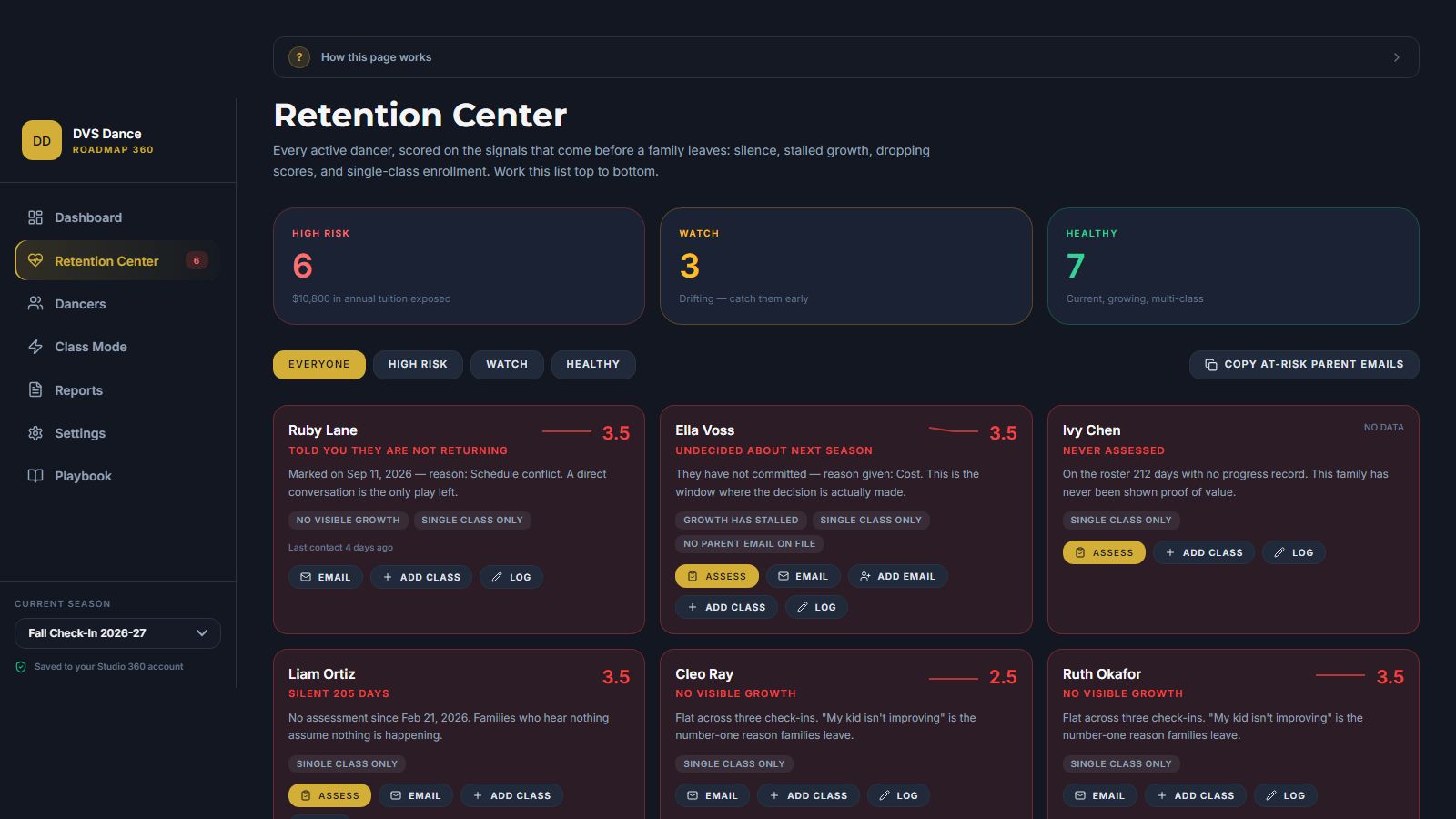
Open the Retention Center. Every dancer is red, amber or green, with the reason and the one thing to do about it: silent 90 days, scores flat three check-ins running, only one class, a sibling who’s leaving. Before the family tells you they’re “taking a break.”
See it in action
What you get
- One-page parent reports on your letterhead — logo, colors, signature — guaranteed to fit one sheet, ready for the fridge
- Built-in rubrics for eight styles with a five-point Mastery Scale and four skill areas each, editable to match how you teach
- “Write it for me” parent notes drafted from the scores in one tap, in plain English a parent understands
- Retention Center that scores ten warning signs for every dancer and puts the fix — a call, an email, a class suggestion — one button away
- Season charts and certificates that show last term ghosted behind this term, so the growth is impossible to miss
- Printable Score Sheets and faculty consistency so every teacher grades against the same definitions and you can see who grades hard, apples to apples
- Everything saved to your Studio 360 account — no staff logins, no other studio can ever see it, and a one-click backup file you own whenever you want a copy
The problem
The dance progress report problem every studio has
Every studio owner knows the conversation. It’s May. A parent you like tells you they’re “taking a break next year.” You knew their kid was improving — you watched it happen every Tuesday. But they never saw it. They saw an invoice, a recital, and a report card that said “Good job!” with a smiley face.
It was never a teaching problem. It was a proof problem. Progress nobody writes down doesn’t exist to a parent. And the family that’s about to leave almost never tells you first. They go quiet. Their scores flatten. Their other kid stops coming. By the time you notice, they’ve already toured the studio across town.
Your management software will check skills off a list and print it with your logo. That’s a report card, and in 40 years of owning a studio we never once saw a report card tell an owner which family was about to walk. Student Success Roadmap 360 writes the progress down, hands it to the parent, and tells you who’s going quiet while there’s still time to do something about it.
The assessment
How to assess a dance student in five minutes
A dance assessment only works if every teacher means the same thing by a “4.” The Roadmap uses one five-point Mastery Scale across every style, with a definition a parent can read:
- 1 — Emerging
- Initial introduction to the concept.
- 2 — Developing
- Understands the concept but lacks consistency.
- 3 — Proficient
- Meets the technical requirements for their age and level.
- 4 — Advanced
- Strong execution with stylistic nuance.
- 5 — Mastery
- Elite standard; ready for the next placement.
Each style is scored in four skill areas. For Ballet they are Posture & Alignment (core stability and verticality), Technical Execution (precision of form and footwork), Musicality (rhythmic accuracy and phrasing) and Artistic Expression (performance quality and intent). Jazz, Hip Hop, Contemporary, Tap, Modern, Acro and Musical Theatre each have their own four, and you can edit any of them or build a new rubric for auditions, pre-pointe or competition team.
In Class Mode you pick a class and the dancers come up one at a time. Four scores, Enter, next dancer — about a minute each. The note drafts itself from the numbers. That is the whole assessment, and it is the same assessment for every teacher in the building because the definitions are printed on the Score Sheet they grade from.
Everything included
What’s in the box
- Ballet
- Jazz
- Hip Hop
- Contemporary
- Tap
- Modern
- Acro
- Musical Theatre
Eight built-in grading rubrics (Ballet, Jazz, Hip Hop, Contemporary, Tap, Modern, Acro, Musical Theatre) and a Rubric Architect for anything else. Class Mode with four-keystroke scoring and drafts that save themselves. “Write it for me” parent notes. One-page Parent Report PDF on your letterhead that always fits one page, with the previous assessment ghosted behind the current one. Season Report PDF for conferences and re-enrollment week. Print a whole class as one PDF. Printable Class Score Sheets for teachers — no staff logins, ever.
Retention Center scoring ten warning signs with a red, amber or green rating, the reason, and a next step for every dancer. Re-enrollment tracking — Returning, Undecided, Not Returning — with the reason, so your re-enrollment rate is real. Contact log for every call, email and meeting. Sibling awareness, because families leave together. Ready-for-More targets: dancers who have earned a second class, what it is worth over a season, and a pre-written email to the parent. Faculty consistency compared apples to apples. Season-over-season studio trajectory on your dashboard. Owner’s ROI sheet: tuition at risk, families saved, and what the program is worth in dollars.
Mastery Certificate on your letterhead and a square Dancer Spotlight graphic for social media. Roster import from Jackrabbit, Dance Studio Pro or any spreadsheet. Spreadsheet export of every assessment. One-click backup file, a sample studio to explore before you commit, and a “How this page works” guide at the top of every screen.
Fair questions
“My software already has a progress report”
“My management software already has a progress report.”
It does — a list of skills checked off as attained, printed with your logo. That is a report card. The Roadmap scores each area on a five-point scale so a parent sees how well, not just whether; shows last term ghosted behind this term; draws the growth line; drafts the note for you — and then turns those scores into a list of who is about to leave, with the reason and the fix. Keep the report card. This is the retention system.
“My teachers won’t do one more thing.”
They don’t have to log in to anything. Print the score sheet, hand it over before class, collect it after. Four circles per dancer. You key it in — or the front desk does — at four keystrokes a dancer.
“I don’t have time to write 200 parent notes.”
Neither does anyone. Score the dancer and tap “Write it for me.” It drafts the paragraph from the scores — strongest area, change since last time, focus for next term. You make it sound like you and move on.
“Where does my students’ information live?”
In your Studio 360 account. Every dancer, score, note and contact log is saved against your membership on our server — not in a shared database, not anywhere another studio could ever see it. Score on the iPad in class and print the reports from the office computer without moving a file. One click saves a backup file you own.
Before you decide
Frequently asked questions
Which dance styles does Student Success Roadmap 360 grade?
Eight are built in: Ballet, Jazz, Hip Hop, Contemporary, Tap, Modern, Acro and Musical Theatre. Each has four skill areas scored on a five-point Mastery Scale, from Emerging to Mastery, with a plain-English definition of each number that parents can read. The Rubric Architect lets you build a scale for anything else — auditions, pre-pointe, competition team, conditioning.
Do my teachers need accounts?
No. The tool is built for the studio owner. From Class Mode you print a Score Sheet for any class — dancer names down the side, your rubric across the top, one to five to circle, and the scale definitions at the bottom so every teacher grades the same way. Collect the sheet and key it in: on a laptop that is four keystrokes per dancer.
What does the parent actually receive?
A one-page report on your letterhead: your logo, brand color, tagline, contact line and signature. It shows a skill chart with the previous assessment ghosted behind the current one, a growth line since the first assessment, a score for each area with the plain-English word for it, the focus for next term with one concrete instruction, and a note from you. It always fits one page.
How does it know a family is at risk?
Every active dancer is scored on ten warning signs: never assessed, no assessment in 75 or 120 days, scores dropping, growth stalled across three check-ins, scoring below 2.5, enrolled in only one class, no parent email on file, a sibling marked as leaving, marked undecided about next season, and marked not returning. Each dancer gets a red, amber or green rating, the reason, and the next step.
Does it email the parent?
It opens your email program with the parent’s address filled in and the progress note already written. Attach the PDF you just saved and send. It logs the contact for you.
Does it work with Jackrabbit or Dance Studio Pro?
It runs alongside them. Export your student list from either one as a CSV file and import it — names, parent emails, classes and levels come across in one step, and matching names are updated rather than duplicated.
Where is my students’ data kept?
In your Studio 360 account. Every dancer, assessment, parent note and contact log is saved against your membership on our server, so you can score on a tablet in class and print from the office computer without moving a file. No other studio can see it, and a one-click backup file you own is there whenever you want a copy.
Does it work on an iPad?
Yes. Class Mode and the score buttons were built for a tablet, and because everything is saved to your Studio 360 account, what you score on the iPad in class is already there when you sit down at the office computer.
Step inside the tool
Go ahead — hover, click, try to use it. Members get the keys; everyone else gets a taste.
This tool is included in Studio 360. Become a member to launch it from your dashboard.
Unlock Full AccessStudent Success Roadmap 360 — interactive preview
Claim an Insider spot
$579
One-time Insiders rate · Lifetime access · The last 100 lifetime seats
3 payments of
$217
Billed monthly x3 · Same lifetime access · 30-Day Guarantee